Language files
If you create a new language file, or have updates for already existing language file, and you want others to enjoy it, send it to info@texteditor.pro. If you find translation errors, let me know.
Current languages: Abkhazian, Arabic, Brazilian, Bulgarian, Chinese, Chinese (Hant), Czech, Dutch, English, Finnish, French, German, Greek, Hungarian, Italian, Japanese, Korean, Polski, Portuguese, Slovak, Slovenian, Spanish, Swedish, Thai, Turkish, Ukrainian, and Vietnamese.
Language editor
You can find the language editor from Tools > Language editor.
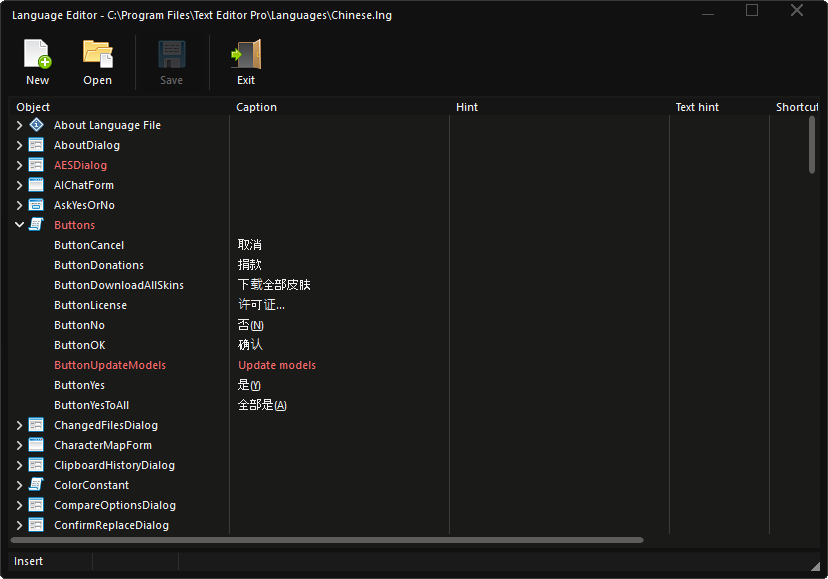
The editor shows caption in red when it is waiting for translation.
Override
Because the installer always overwrites language files, it is possible to create override language files where you can add only the data you want to override. Installer does not apply to overridden files.
- The extension of the override language file is “.override”.
- Encoding for the file must be Unicode (UTF-16 Little Endian).
- The file must be added to the Languages directory.
Note! Shortcuts may already exist and duplicates must be cleared or changed.
For example
File: English.override
[MainForm]
ActionEditDeleteLine:s=Ctrl+Del
ActionEditDeleteWordForward:s=Ctrl+Y
ActionFileNew=&New file

[Constant]
OpenWith=Edit with